A server-rendered page with PrimeUI components can go wrong in ways a client-rendered page does not. The HTML arrives, but the components stay plain browser elements until the JavaScript runs. Or the page paints in light mode and switches to dark a moment later. Sometimes nothing looks wrong at all and the console reports a hydration mismatch, because an id in the server HTML does not match the one the browser generated.
Each time, the server HTML either lacks something the browser adds later or
differs from what the browser produces. For the styles, the cause is how the
theme is built. In styled mode the theme is not a CSS file that a bundler links
into the page. The library builds the CSS at runtime from the preset and the
theme options, and writes it into <style> elements as the components need it.
On the server there is no browser page to write into, so the styles have to be
rendered into the response on purpose, and in the browser the library has to
take those elements over instead of writing them a second time. Each library
does this differently, and the setups below apply to PrimeVue 5.0.3 and later,
PrimeReact 11.2.1 and later, and PrimeNG 22.1.3 and later.
What the server response needs
For the first paint to look right, the HTML coming from the server has to carry:
- The theme variables: the primitive, semantic and global token blocks, plus one block per component.
- The component styles: the base rules, and the rules of every component on the page.
- When
cssLayeris on, those rules inside their@layerblocks, with the order declaration ahead of them in the libraries that render it on the server. - Ids on the elements that match what the browser will generate during hydration.
- The dark mode state, when the selector is a class or an attribute rather than the system setting.
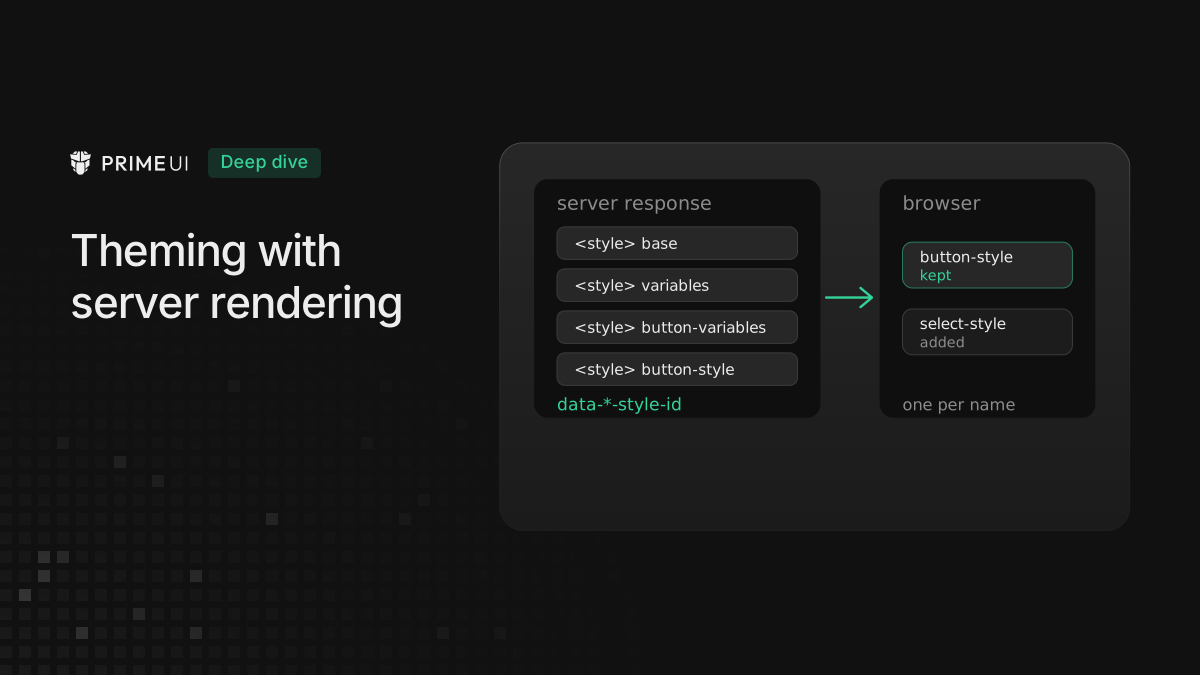
Every style element the libraries write carries a name attribute:
data-primevue-style-id, data-primereact-style-id or data-primeng-style-id.
That attribute is how the browser side finds an element the server already
rendered, so it is also the first thing to look for in the page source when a
server-rendered page comes out unstyled.
PrimeVue with Nuxt
The Nuxt module renders the styles on the server by default. The relevant part of the configuration is the theme itself:
// nuxt.config.ts
import Aura from '@primeuix/themes/aura';

export default defineNuxtConfig({
    modules: ['@primevue/nuxt-module'],
    primevue: {
        options: {
            theme: {
                preset: Aura
            }
        }
    }
});
With that in place the module collects the style objects of every registered
component at build time, and on each request a server plugin adds two groups of
<style> elements to the end of the head: the component styles, then the theme
variables. The components are styled before any JavaScript has run. Each element
has its data-primevue-style-id, so when the app starts in the browser, the
style loader finds the element by that name and keeps it instead of writing a
second copy.
For an app that loads the CSS another way, loadStyles: false turns the server
rendering of styles off. A page with a Content Security Policy sets
options.csp.nonce, and the module applies it to the server-rendered style
elements.
An isolated app needs a key in the module options, isolation: { key: 'shop' },
because the server and the browser have to agree on it. The module then renders
the root element with data-p-theme="shop" and the scoped styles, and the
browser claims the same key on hydration. The setup is in
Running two PrimeUI apps on one page.
PrimeVue without Nuxt
An app that renders with renderToString from vue/server-renderer has to do
what the module does: build the same style elements and put them in the head.
The style object of each component has methods for this. This example renders a
page with a Button, and it was run in Node against the published 5.0.3 packages:
import { createSSRApp, h } from 'vue';
import { renderToString } from 'vue/server-renderer';
import { Theme } from '@primeuix/styled';
import Aura from '@primeuix/themes/aura';
import PrimeVue from 'primevue/config';
import Button from 'primevue/button';
import BaseStyle from '@primevue/core/base/style';
import BaseComponentStyle from '@primevue/core/basecomponent/style';
import ButtonStyle from 'primevue/button/style';

const theme = { preset: Aura };

Theme.setTheme(theme);

const styles = [BaseStyle, BaseComponentStyle, ButtonStyle];

const head = [
    ...styles.map((style) => style.getStyleSheet()),
    BaseStyle.getCommonThemeStyleSheet(),
    ...styles.map((style) => style.getThemeStyleSheet())
].join('');

const app = createSSRApp({ render: () => h(Button, { label: 'Save' }) });

app.use(PrimeVue, { theme });

const body = await renderToString(app);
const page = `<!doctype html><html><head>${head}</head><body><div id="app">${body}</div></body></html>`;
getStyleSheet() returns the component’s own CSS as a <style> string,
getCommonThemeStyleSheet() the three token blocks and the global style, and
getThemeStyleSheet() the component’s variables and theme rules. For this page
the head ends up with seven elements, named base, primitive-variables,
semantic-variables, global-variables, global-style, button-variables and
button-style. Theme.setTheme has to run before the getters, since they read
the active preset. Every component on the page needs its style object in the
list, or it renders unstyled until the browser loads it.
The getters cover the token variables and the component styles, not the CSS a
preset adds under css. On 5.0.3 a rule such as .p-button-accent written in
components.button.css is not in the server output, with these getters or with
the Nuxt module; PrimeVue writes it once the app starts in the browser. The
variables that rule reads are in the response, the rule itself is not.
Each getter takes a props object as its last argument for attributes on the
element, which is where a nonce goes.
With cssLayer on, the same getters wrap every rule in
@layer primevue { ... } (or whatever name the option sets), but the order
declaration from cssLayer.order is not part of the server output, here or in
the Nuxt module. PrimeVue writes that element in the browser. A cascade layer
takes its position from the first place its name appears, so on the first paint
the theme layer is ordered by its first @layer block. An app that needs the
theme layer behind its own declares the order in CSS that loads before the
theme, for example @layer app, primevue; at the top of its stylesheet.
PrimeReact with Next.js
Next.js streams the HTML, so the styles cannot be assembled up front the way the
Vue example does. PrimeReact collects them while rendering instead.
PrimeReactStyleSheet is the collector, and useServerInsertedHTML from
Next.js is the hook that flushes it into the stream. The provider goes in its
own client component:
// prime-ssr-provider.tsx
'use client';
import { PrimeReactProvider, PrimeReactStyleSheet } from '@primereact/core';
import { useServerInsertedHTML } from 'next/navigation';
import * as React from 'react';
import Aura from '@primeuix/themes/aura';

const styledStyleSheet = new PrimeReactStyleSheet();

export default function PrimeSSRProvider({ children }: Readonly<{ children?: React.ReactNode }>) {
    useServerInsertedHTML(() => {
        const styleElements = styledStyleSheet.getAllElements();

        styledStyleSheet.clear();

        return <>{styleElements}</>;
    });

    return (
        <PrimeReactProvider theme={{ preset: Aura }} stylesheet={styledStyleSheet}>
            {children}
        </PrimeReactProvider>
    );
}
// app/layout.tsx
import PrimeSSRProvider from './prime-ssr-provider';
export default function RootLayout({ children }: Readonly<{ children: React.ReactNode }>) {
return (
<html lang="en">
<body>
<PrimeSSRProvider>{children}</PrimeSSRProvider>
</body>
</html>
);
}On the server, the first component of each kind adds its CSS to the collector
under the style’s name. Later instances of the same component find the name and
add nothing. The collector reserves the layer-order entry as its first slot,
so the @layer declaration comes out ahead of the other collected styles even
though the theme fills it in later. useServerInsertedHTML then turns the
collected entries into <style data-primereact-style-id="..."> elements, in
insertion order, and clears the collector for the next render. Rendering a page
with one Button against the published 11.2.1 packages produces nine of them:
layer-order, base, the three variable blocks, global-style,
preflight-style, button-variables and button-style.
The collector is created once, at module level, and the file is marked
'use client' because the provider uses context and hooks. In the browser, the
style loader looks up style[data-primereact-style-id="..."] before creating
anything, so the elements from the server are reused.
The reset in preflight-style lives in the primeui.base layer, and in a
server response the layer declaration lands after the app’s own CSS. An app that
declares its own layers, with Tailwind v4 for example, adds @layer primeui;
above the Tailwind import so the order holds on the first paint too. The
PrimeReact 11.2.0 post has the same setup.
In isolated mode the server derives the app’s key from React’s useId, so a key
is only needed when custom CSS refers to it.
PrimeNG with Angular SSR
PrimeNG needs no SSR-specific setup. Angular gives the server render a document
of its own, and PrimeNG writes into it the way it writes into a browser
document: when a component initializes, it loads its core CSS, the theme
variables, its own theme rules and the layer order into the head of that
document, each as a <style data-primeng-style-id="..."> element. Angular then
serializes the whole document, head included, into the response. On the browser
side those elements are matched by name and kept, while
provideClientHydration() takes care of the DOM itself.
One part of the theme is not in the server response. The scoped styles of a
component that uses the dt prop are loaded only after hydration, so an
instance with its own tokens paints with the shared theme first and takes its
overrides a moment later.
Ids changed in 22.1.3. Up to 22.1.2 the id generator was a counter shared by the
whole server process, so the second request rendered pn_id_4 where the first
rendered pn_id_1, and the browser, which starts from one on hydration,
disagreed with every response after the first. Ids now come from a service in
the application’s root injector, so each request starts the sequence over and
matches the browser. When more than one Angular application renders on a page,
give each a non-default APP_ID. Every id includes it, so two applications
never share one. An isolated application without an explicit key uses that id as
its key on the server, so two server-rendered isolated applications on one page
need either their own APP_ID values or explicit keys.
Ids and hydration
Only PrimeNG before 22.1.3 had the shared counter. PrimeVue takes its ids from
Vue’s useId, and PrimeReact from React’s useId. Both produce the same
sequence on the server and in the browser. Rendering the same page twice in one
Node process gives the same ids both times: pv_id_0 and pc0 in PrimeVue,
pr_id__R_1_ and pc__r_1h1_ in PrimeReact. These ids appear in
aria-controls, aria-labelledby, data-pc-id and data-id, so a mismatch
shows up as a hydration warning rather than a visible defect.
Dark mode on the first paint
With the default darkModeSelector: 'system', the dark rules sit behind a
prefers-color-scheme media query, and the browser applies them on the first
paint with nothing done on the server.
A class or attribute selector such as .app-dark is different. The dark rules
only apply while the selector matches on <html>, and none of the libraries
sets that class. The Nuxt module leaves the <html> attributes alone, and the
PrimeReact and PrimeNG providers do the same. If the app adds the class in the
browser, from localStorage for example, the server HTML has no class, the page
paints light, and it switches once the script runs. To avoid that, the decision
has to be available on the server, usually as a cookie, and rendered onto
<html> with the framework’s own tools: useHead with htmlAttrs in Nuxt, the
className of the <html> element in the Next.js root layout, and the document
element in Angular. An isolated app follows the same <html> class, since it
mirrors the selector onto its own elements.
Checking a page
To check whether the setup works:
- View the page source, not the DOM, and search for the style name attribute of
the library. The variable blocks and one
*-styleelement per component on the page should be there. - After hydration, count the style elements in the DOM. There should be one per
name. Two elements with the same name mean the browser wrote its own copy
instead of reusing the server’s, which is usually a name mismatch between the
two sides, for example a
classPrefixor isolation key set on one side only. - Keep the console open on the first load. A hydration warning that mentions an
aria-*oridattribute points at the id sequence.
PrimeVue documents this setup on its Nuxt module page and PrimeReact in its Next.js guide. The server-rendering notes on keys are on the isolated mode pages.