When another stylesheet on the page restyles an app’s PrimeVue, PrimeReact or
PrimeNG components, it is matching their class names. Every component class
starts with p- (p-button, p-select, p-dialog-mask), so a rule written
for those names anywhere on the page applies to the app’s components too. The
most common case is a second copy of the library, for example one that a browser
extension injects into the page: its .p-button rule matches the app’s buttons.
The theme has had a prefix option for a long time, and it looks like it should
cover this, but it does not. The option for this case is classPrefix. It was
added in @primeuix/styled 1.1.0 and works in PrimeVue 5.0.3 and later,
PrimeReact 11.2.1 and later, and PrimeNG 22.1.3 and later.
prefix and classPrefix
prefix renames the CSS variables. With prefix: 'exam', the theme defines
--exam-primary-color instead of --p-primary-color, and the component rules
read the new names. The class names do not change: the button is still
.p-button, and the rule that styles it is still written for .p-button.
On its own, prefix does not protect an app. Say an app uses prefix: 'exam'
and a second copy of PrimeVue on the page uses the default prefix. The second
copy’s .p-button and .p-toggleswitch rules match the first app’s components.
Those rules read --p-* variables, which the first app never defined, so they
resolve to nothing and the toggle switches stop rendering.
classPrefix renames the classes. It is a theme option, next to prefix:
// PrimeVue
app.use(PrimeVue, {
    theme: {
        preset: Aura,
        options: { classPrefix: 'acme' }
    }
});
// PrimeReact
<PrimeReactProvider theme={{ preset: Aura, options: { classPrefix: 'acme' } }}>
<App />
</PrimeReactProvider>// PrimeNG
providePrimeNG({
theme: {
preset: Aura,
options: { classPrefix: 'acme' }
}
});A Button then renders as:
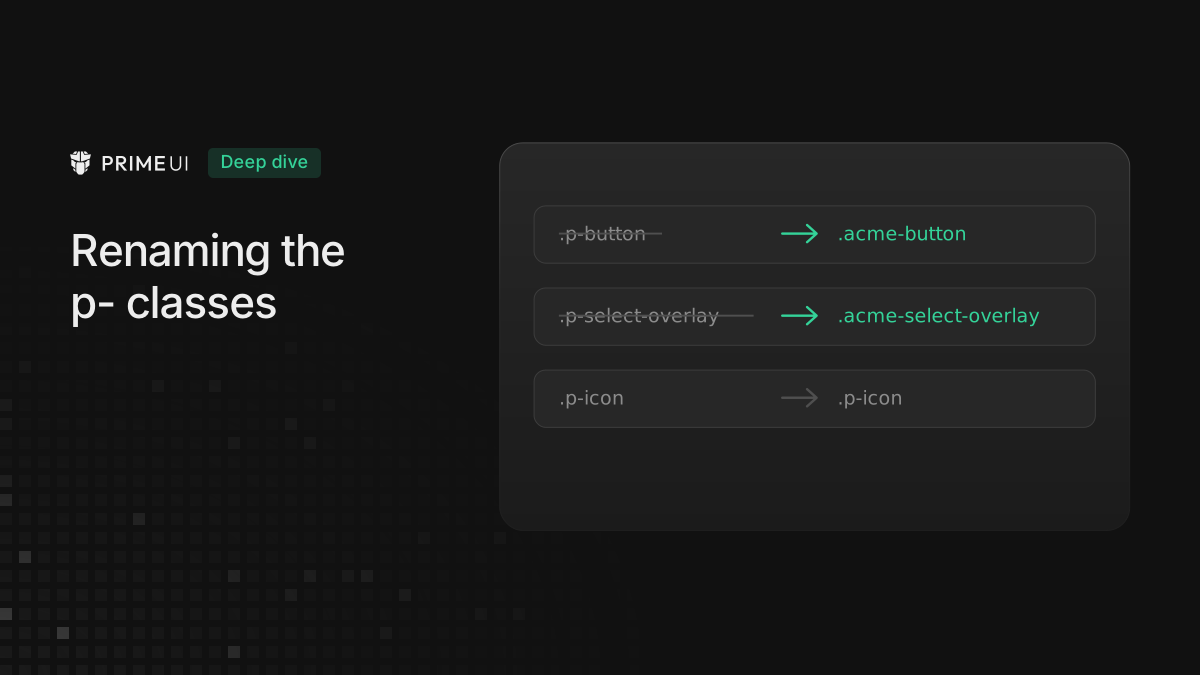
<button class="acme-button acme-component">Save</button>and the theme writes its rules for .acme-button. A stylesheet that targets
.p-button no longer matches anything in the app. To give the variables their
own names as well, set both options:
options: {
    prefix: 'exam',
    classPrefix: 'exam'
}
What is renamed
Everything the library generates or renders as a component class. With
classPrefix: 'acme', a PrimeVue Button with an icon renders as:
<button class="acme-button acme-component" type="button" aria-label="Save" data-pc-name="button" data-pc-id="pc0" data-pc-section="root">
    <span class="acme-button-icon acme-button-icon-left pi pi-check" data-pc-section="icon"></span>
    <span class="acme-button-label" data-pc-section="label">Save</span>
</button>
and the PrimeReact Button as:
<button data-scope="button" class="acme-button acme-component" data-styled="button" data-slot="root">Save</button>Overlays are renamed with the rest. The Select panel appended to body is
acme-select-overlay acme-component, and its enter animation classes are
acme-anchored-overlay-enter-from and acme-anchored-overlay-enter-active.
The generated CSS is written for the new names, and the page has no .p-button
rule at all. The button rule now reads:
.acme-button {
    display: inline-flex;
    cursor: pointer;
    user-select: none;
    align-items: center;
    justify-content: center;
    overflow: hidden;
    position: relative;
    color: var(--p-button-primary-color);
    ...;
}
The variable inside it still starts with --p-, because classPrefix renames
classes and nothing else; the variable prefix is prefix, covered in the next
section.
The p- classes in CSS passed through the theme are renamed as well. A preset
with css: '.p-button-accent { ... }' is written out as .acme-button-accent,
and the same goes for the css of a component in the preset.
The style elements in the head get a suffix too, so two copies of the library with different class prefixes write to separate elements instead of overwriting each other. With the prefix above, the head holds:
<style data-primevue-style-id="primitive-variables@p-acme">...</style>
<style data-primevue-style-id="semantic-variables@p-acme">...</style>
<style data-primevue-style-id="global-variables@p-acme">...</style>
<style data-primevue-style-id="global-style@p-acme">...</style>
<style data-primevue-style-id="base@p-acme">...</style>
<style data-primevue-style-id="button-variables@p-acme">...</style>
<style data-primevue-style-id="button-style@p-acme">...</style>
The suffix has the form @<prefix>-<classPrefix>, and it is only added when
classPrefix is something other than p. An app that sets only prefix keeps
the ids it has today.
What is not renamed
The icon classes keep their names: p-icon, p-icon-spin and the other
p-icon-* classes. The icon packages render them without knowing the prefix, so
renaming them in the theme would leave the icons unsized. The list of kept names
is exported from @primeuix/styled as CLASS_PREFIX_KEEP. It is marked
experimental, because it may go away once the icon packages read the prefix
themselves.
The app’s own classes stay exactly as written, whether they are a class or
className put on a component or the value of an icon or styleClass input.
Data attributes such as data-pc-name, data-pc-section and data-scope do
not change either, and the variable names change only when prefix is also set.
What to update
Start with the app’s own CSS: an override written as .p-button.wide { ... }
has to become .acme-button.wide { ... }. The same applies to end-to-end tests
and anything else that finds elements by class.
Code that builds a selector for a library element, such as a test helper or a
querySelector call, can read the prefix from the theme instead of hard coding
it. Each library has the same three helpers in its utils entry,
@primevue/core/utils, @primereact/core/utils and primeng/utils:
import { Theme } from '@primeuix/styled';
import { getClassPrefix, prefixSelector } from '@primevue/core/utils';

const overlay = document.querySelector(prefixSelector('.p-select-overlay', getClassPrefix(Theme)));
// with classPrefix: 'acme', the selector is '.acme-select-overlay'
prefixClasses does the same for a class string.
Which option to use
The page and the app that joins it need different options.
The page that wants to protect itself sets classPrefix, together with
prefix. Then another copy of the library cannot match its classes, read its
variables, or write into its style elements. One thing is still shared: the
other copy’s theme sets color-scheme on :root, so if that copy uses dark
mode the page’s native form controls and scrollbars follow it.
An extension or a micro frontend is on the other side: it joins someone else’s
page, and it uses isolated mode. Isolated mode scopes every rule and variable to
the app’s own elements, whatever the class names are, and it can be combined
with classPrefix. The setup is in
Running two PrimeUI apps on one page.
classPrefix is documented with the other theme options on the Styled Mode page
of PrimeVue,
PrimeReact and
PrimeNG.