Chart 1.3.0 is out for Vue, React and Angular. It adds a chart type,
ChartHistogram, and makes time-axis dates follow the chart’s locale and time
zone. The rest are fixes, most of them to stacking containers, axes and legends.
Two changes need attention when upgrading, and they are listed at the end.
npm install @primeui/[email protected]
npm install @primeui/[email protected]
npm install @primeui/[email protected]
Histogram
A histogram looks like a bar chart, but it starts from different data. A bar chart takes rows that are already aggregated, one bar per row. A histogram takes raw observations, a few hundred response times or a few thousand finish times, and groups them into ranges called bins. Each bar is one bin, and its height is how many observations fell into it.
That makes the horizontal axis continuous, not categorical. A bar spans a range of values, so its width carries data. The chart draws every bin at the width of its own range, which matters as soon as the ranges are unequal.
ChartHistogram is a series like ChartBar or ChartLine. The smallest useful
one binds a field of the observations with binXField and nothing else:
import { ChartHistogram, ChartSvg, ChartXAxis, ChartYAxis } from '@primeui/react-chart';

const data = [182, 196, 149, 205, 168, 233, 158, 177, 214, 190, 163, 248 /* ... */].map((ms) => ({ ms }));

export function ResponseTimes() {
    return (
        <ChartSvg height={460}>
            <ChartHistogram data={data} binXField="ms" />
            <ChartXAxis label="Response time (ms)" />
            <ChartYAxis label="Requests" />
        </ChartSvg>
    );
}<script setup lang="ts">
import { ChartHistogram, ChartSvg, ChartXAxis, ChartYAxis } from '@primeui/vue-chart';
const data = [182, 196, 149, 205, 168, 233, 158, 177, 214, 190, 163, 248 /* ... */].map((ms) => ({ ms }));
</script>
<template>
<ChartSvg :height="460">
<ChartHistogram :data="data" bin-x-field="ms" />
<ChartXAxis label="Response time (ms)" />
<ChartYAxis label="Requests" />
</ChartSvg>
</template>import { Component } from '@angular/core';
import { ChartModule } from '@primeui/angular-chart';
@Component({
selector: 'response-times',
imports: [ChartModule],
template: `
<div style="height: 460px">
<p-chart-svg>
<p-chart-histogram [data]="data" binXField="ms" />
<p-chart-x-axis label="Response time (ms)" />
<p-chart-y-axis label="Requests" />
</p-chart-svg>
</div>
`
})
export class ResponseTimes {
readonly data = [182, 196, 149, 205, 168, 233, 158, 177, 214, 190, 163, 248 /* ... */].map((ms) => ({ ms }));
}As with every chart type, the three frameworks differ only in template syntax,
and ChartCanvas draws the same chart as ChartSvg.
Binning happens before layout. After that step the rest of the pipeline sees
bars, so axes, tooltips, legends, zoom and annotations behave as they do for
ChartBar, and the styling props are the bar family’s: borders, radii,
gradients, hover colours. The one difference is what an accessor receives. A
color or borderColor callback is called with a bin, not with one of your
rows:
type Bin = {
    x0: number; // lower bound, inclusive
    x1: number; // upper bound, exclusive except in the last bin
    count: number; // observations in the range
    value: number; // the bar's height, equal to count unless reduce is set
};
Choosing the bins
bins decides how the range is cut. With no value it uses the square-root rule,
which derives the number of bins from the number of observations. 'sturges'
and 'rice' are the other two named rules. A rule keeps the bin count in
proportion as the data grows, which a fixed number does not, but a number works
too: bins={12}.
binWidth sets the width of each bin in data units instead, and wins over
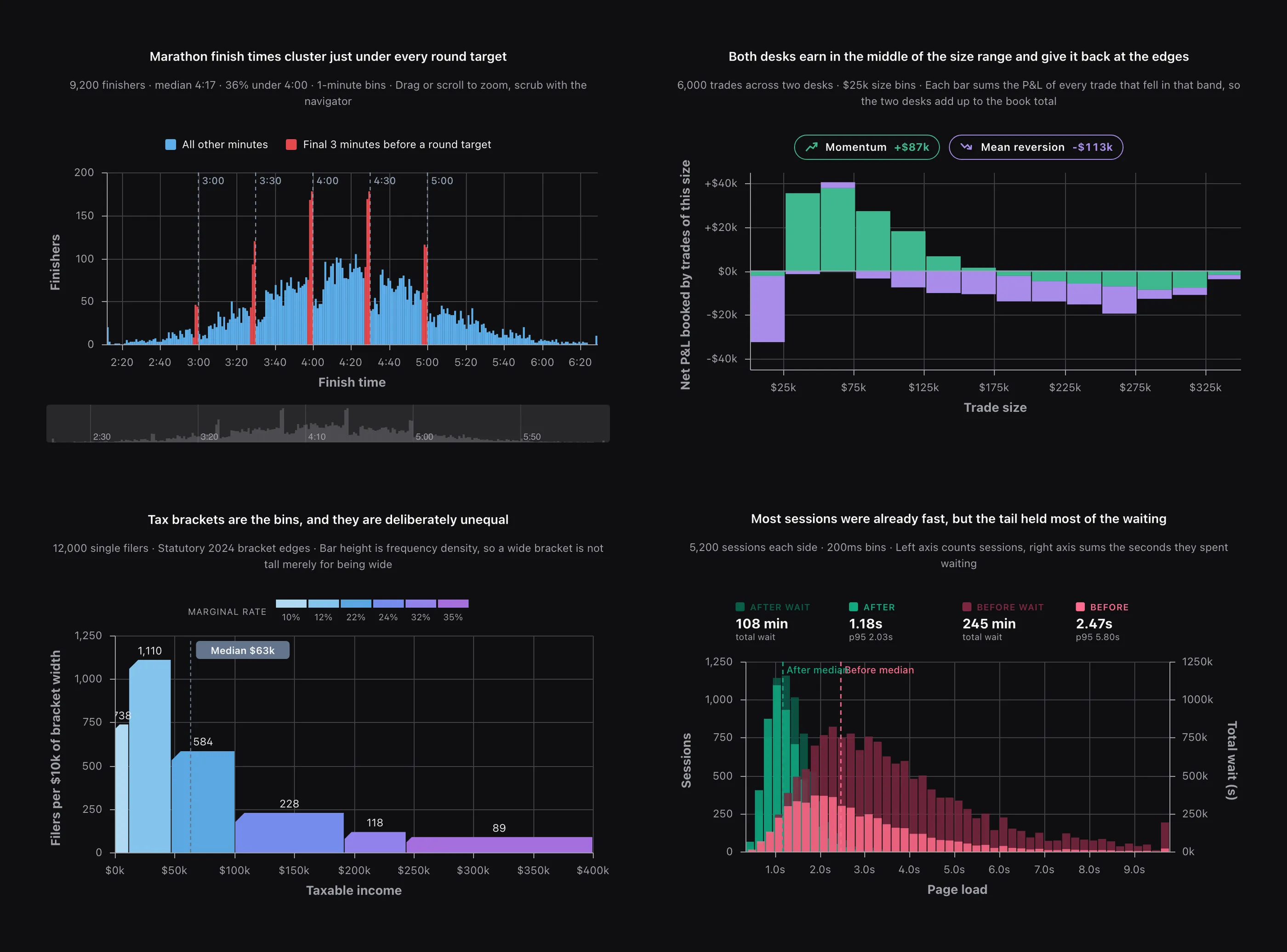
bins. The marathon chart above uses binWidth={1} on finish times in minutes.
At that resolution the runners bunched in the last few minutes before 3:00,
3:30 and 4:00 show up as spikes, which a coarser setting would average away.
When the span does not divide evenly, the last bin extends past the largest
observation.
For full control, bins takes an array of N+1 edges for N bins. The edges do
not have to be evenly spaced. The tax chart above uses the statutory bracket
boundaries as its edges, so the bins are as unequal as the brackets themselves,
and each bar is drawn exactly as wide as its bracket.
Counting or aggregating
By default a bar is a count. Bind a measure with valueYField and set reduce
to 'sum', 'mean', 'min' or 'max', and each bar becomes that aggregate of
its members instead. A summed signed measure can go below zero, and those bars
hang down from the baseline, as in the P&L chart above, where each bar is the
profit or loss of every trade in that size band.
reduce is also how to draw a frequency density. Wide bins collect more
observations simply for being wide, so on unequal bins a plain count overstates
them. The tax chart sums a per-width weight instead of counting, so a bar’s
height is filers per $10k of bracket, and the wide top bracket is not tall just
because it is wide.
Several series
Two ChartHistogram series draw side by side within each bin. ChartStacked
stacks them and ChartOverlap layers them at the same position:
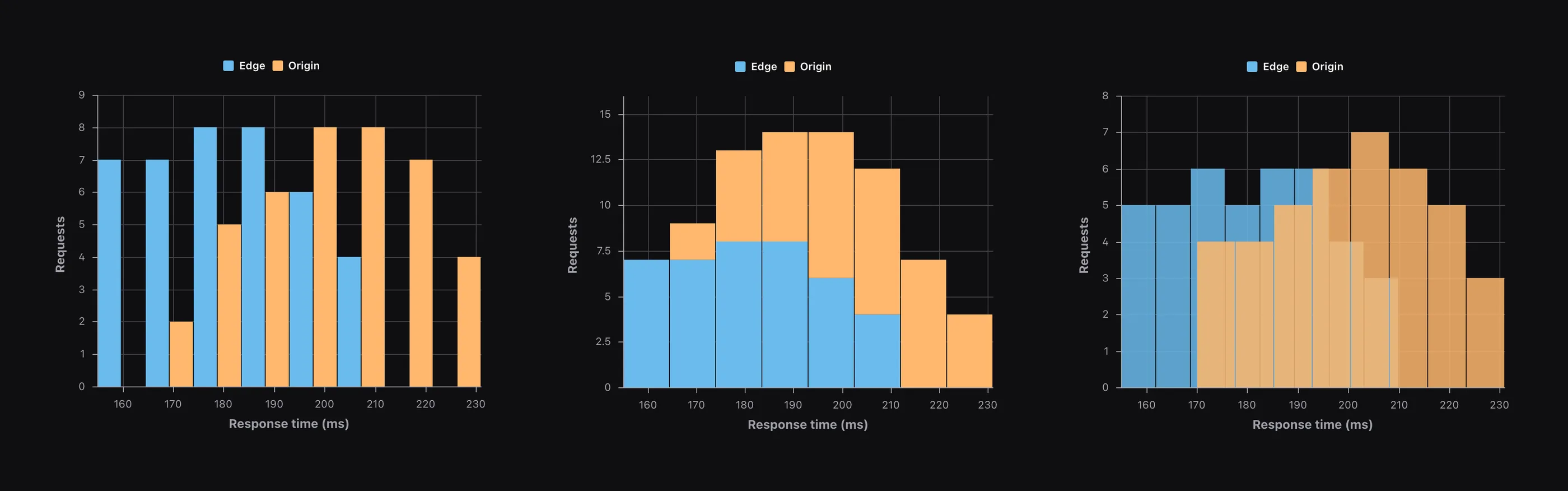
Grouped and stacked series share one set of bin edges, pooled across every
series, so the bars line up and stay comparable. Under ChartOverlap each
series keeps its own bins, as the third panel shows. Passing the same bin count
to both is not enough to line them up, because each series cuts its own range.
Pass the same array of edges to both when the overlaid distributions need to be
compared bin by bin. Overlap also lowers the fill opacity of overlaid series on
its own, and it does not narrow the bars the way it does for ChartBar, since a
histogram bar’s width is its bin.
bins can be anything shown above. The three panels in that image are this,
with ChartStacked or ChartOverlap wrapped around the two series:
<ChartSvg height={460}>
    <ChartHistogram data={edge} binXField="ms" bins={8} name="Edge" />
    <ChartHistogram data={origin} binXField="ms" bins={8} name="Origin" />
    <ChartXAxis label="Response time (ms)" />
    <ChartYAxis label="Requests" />
    <ChartLegend />
</ChartSvg>
Toggling a series in the legend rescales the value axis, while the pooled edges stay where they are.
Horizontal
Bind binYField instead of binXField and the bins run down the Y axis, with
the count on X. There is no orientation prop: the axis the observations are
bound to decides it.
With the rest of the chart
The tax chart is a fair summary of how a histogram combines with the other
components. Its bins are explicit edges, its bars are a summed density,
renderShape chamfers their corners, and ChartAnnotation draws the median.
Trimmed to the histogram parts:
import { ChartAnnotation, ChartDataLabels, ChartHistogram, ChartSvg, ChartTooltip, ChartXAxis, ChartYAxis, type BarShapeInfo, type Bin, type ItemContext } from '@primeui/react-chart';

const BRACKET_EDGES = [0, 11_600, 47_150, 100_525, 191_950, 243_725, 400_000];
const RATE_RAMP = ['#afd9f3', '#85c4ec', '#5ba8e1', '#758cee', '#9182eb', '#a56fdf'];

const binColor = (ctx: ItemContext<Bin>) => RATE_RAMP[BRACKET_EDGES.indexOf(ctx.datum.x0)];

const chamfer = ({ x, y, width, height }: BarShapeInfo) => {
    const cut = Math.min(10, width / 3, height / 3);

    return `M ${x} ${y + height} L ${x} ${y + cut} L ${x + cut} ${y} L ${x + width} ${y} L ${x + width} ${y + height} Z`;
};

export function IncomeByBracket({ filers }: { filers: { income: number; perTenK: number }[] }) {
    return (
        <ChartSvg height={460}>
            <ChartHistogram data={filers} binXField="income" valueYField="perTenK" reduce="sum" bins={BRACKET_EDGES} color={binColor} renderShape={chamfer} />
            <ChartAnnotation>{/* median marker */}</ChartAnnotation>
            <ChartDataLabels />
            <ChartXAxis label="Taxable income" />
            <ChartYAxis label="Filers per $10k of bracket width" />
            <ChartTooltip />
        </ChartSvg>
    );
}
renderShape returns an SVG path string, so the same function shapes the bars
in canvas mode.
A few components behave differently on a histogram, because its rows are bins:
ChartTooltipshows the bin’s range next to the value, formatted with the axis tick format.ChartZoomandChartNavigatormove the viewport over bins computed once from the full dataset. Zooming in does not re-bin.ChartDecimationdoes not apply. Dropping a bin would drop every observation in it, so the number of bins is controlled bybinsandbinWidthinstead.- Observations that are not finite numbers (
null,undefined,NaN) are left out before binning, and the counts cover the rest. There is noconnectNulls, since there is no slot per row to keep. - Declarative
ChartItemchildren are one observation each, bound withbinXorbinY, not one bar each.
Screen readers
A histogram is announced as a histogram, and each bin as an interval: “160 to 170”, with a word in place of a dash, so it reads correctly aloud. The phrases are in all 14 locale packs, a range stays left to right on a right to left page, and Japanese and Polish close the range the way their grammar expects. The data table and keyboard navigation step through bins with the same ranges.
Time-axis dates
Tooltips and point labels on a time axis now format dates in the chart’s locale and in the time zone of the axis each series is bound to. Before, one zone applied to the whole chart, so with two time axes in different zones, one series’ dates were read in the other axis’s zone. The data table and the CSV export write dates as sortable text, so a spreadsheet orders them correctly without parsing a localised string.
Fixes
In all three frameworks:
- Stacked, overlap and waterfall containers apply only to the series inside
them. A chart with two
ChartStackedgroups normalises each percent stack on its own. - A second y axis on the same side no longer replaces the first.
- Synced charts match numeric axes by value instead of by row number.
- Bars and candles keyed by
Datevalues are placed at their dates. ChartItemchildren inherit chart-level styling instead of dropping it.- A mistyped field name no longer plots the field name itself as a value.
- Treemap resolves dotted field paths like the other chart types, polar charts paint gradients and patterns per wedge, a pie no longer shrinks to make room for data labels it does not draw, and a data label formatter runs when the label’s display is set to none.
- Numeric axes reserve room for their edge labels.
- Logarithmic axes animate instead of snapping, and ticks below one decade show exact decimals.
- A side legend stays inside the strip reserved for it, with one gap around it instead of two.
- A pan that interrupts a bar entrance ends the entrance instead of stalling it.
- The plot area sits on whole pixels, so its edges are sharp, and a line drawn along the edge keeps its full stroke.
Vue only: ChartItem children declared in a template update the chart when
their props change. Custom reference bands are clipped to the plot area.
React only: custom reference bands are clipped to the plot area.
Angular only: on the canvas renderer, the value axis animates with the bars instead of jumping to its final range.
Upgrading
Two changes can affect an existing chart.
Tooltips and data labels on percent-stacked bars now report the raw value as
value and the share as percentage. Before 1.3.0, value held the share. A
formatter that reads value and appends a percent sign will now print the raw
number, so read percentage instead. Nothing fails to compile here, so check
those formatters by eye.
The ChartRef type is removed. It declared five methods that no framework ever
implemented. Type a chart ref with ChartExpose, which describes what the ref
actually carries (redraw() and $plugins) and is the same in Vue, React and
Angular. Two smaller type changes go with it: BarShapeInfo.ctx is removed, and
a custom seriesTypes text group in a locale pack needs a histogram entry.
Everything else is additive or a fix. The histogram reference and examples, with live demos, are on vue.primeuipro.dev, react.primeuipro.dev and angular.primeuipro.dev.