TextEditor 1.1.0 is out for Vue, React and Angular. The three packages share one editor core, so the Markdown changes below are the same in all three. One fix, for Angular forms, is Angular only.
npm install @primeui/[email protected]
npm install @primeui/[email protected]
npm install @primeui/[email protected]
A Markdown document could be saved but not loaded
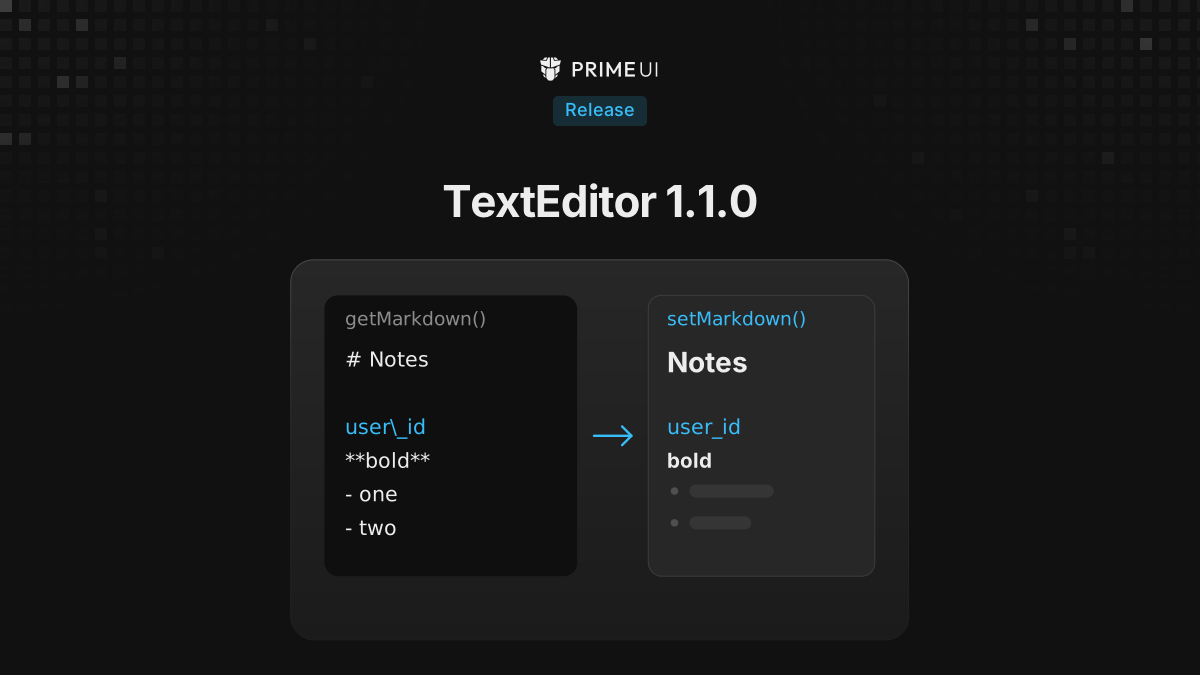
getMarkdown() has been there since 1.0 and returns the document as
Markdown. A team evaluating the editor reported that a document saved this way
could not be loaded back. The editor’s value is HTML, so assigning a
Markdown string to v-model, value or [(value)] showed the literal
characters: # Title stayed # Title, with the hash, in a paragraph.
1.1.0 adds setMarkdown(). It parses a Markdown string and replaces the
document with the result. The bound value stays HTML: after the call, the
model holds <h1>Title</h1>, not the source string. Nothing about how the
value is stored changes, and code that already reads the value as HTML keeps
working.
setMarkdown() is on the same surfaces as setValue(). In Vue it comes from
the root’s slot:
<script setup lang="ts">
import { TextEditor } from '@primeui/vue-texteditor';
import { ref } from 'vue';

const html = ref<string | string[]>('');
const saved = '# Release notes\n\nKeys use `snake_case`, e.g. user\\_id.';

function store(markdown: string) {
    localStorage.setItem('notes', markdown);
}
</script>

<template>
    <TextEditor.Root v-slot="{ getMarkdown, setMarkdown }" v-model="html">
        <TextEditor.Toolbar>
            <button type="button" @click="setMarkdown(saved)">Load</button>
            <button type="button" @click="store(getMarkdown())">Save</button>
        </TextEditor.Toolbar>
        <TextEditor.Content />
    </TextEditor.Root>
</template>
In React, any component inside the root reads it from the editor context:
import { TextEditor, useTextEditorContext } from '@primeui/react-texteditor';
import { useState } from 'react';

function MarkdownActions({ saved, onSave }: { saved: string; onSave: (markdown: string) => void }) {
    const { getMarkdown, setMarkdown } = useTextEditorContext();

    return (
        <>
            <button type="button" onClick={() => setMarkdown(saved)}>
                Load
            </button>
            <button type="button" onClick={() => onSave(getMarkdown())}>
                Save
            </button>
        </>
    );
}

export function NotesEditor({ saved, onSave }: { saved: string; onSave: (markdown: string) => void }) {
    const [html, setHtml] = useState<string | undefined>('');

    return (
        <TextEditor.Root value={html} onValueChange={setHtml}>
            <TextEditor.Toolbar>
                <MarkdownActions saved={saved} onSave={onSave} />
            </TextEditor.Toolbar>
            <TextEditor.Content />
        </TextEditor.Root>
    );
}
onValueChange fires once with the parsed HTML, so html above is up to date
after a load. In Angular the method is on the TextEditorRoot instance:
import { Component, signal, viewChild } from '@angular/core';
import { TextEditorModule, TextEditorRoot } from '@primeui/angular-texteditor';

@Component({
    selector: 'notes-editor',
    imports: [TextEditorModule],
    template: `
        <p-text-editor-root [(value)]="html">
            <p-text-editor-toolbar />
            <p-text-editor-content />
        </p-text-editor-root>
    `
})
export class NotesEditor {
    readonly html = signal<string | undefined>('');
    readonly editor = viewChild.required(TextEditorRoot);

    load(saved: string) {
        this.editor().setMarkdown(saved);
    }
}
A few rules come from the shared core.
A call that reaches the editor before its view exists is not dropped. The HTML is held and used as the first document, which covers the common case of data arriving while the editor is still mounting. If a second call comes later, the later one wins.
Block mode ignores the call and logs a warning. A Markdown string has no block
boundaries, so there is no honest way to split it into the array block mode
expects. The warning says to convert the content to an array of block HTML
and pass it to setValue().
Input longer than 100,000 characters is refused, and the document stays as it was. The cap exists because some Markdown inputs, long runs of unclosed delimiters in particular, take quadratic time to parse. Pasting Markdown over the cap falls back to a plain paste instead of being converted.
The parser now reads what the serializer writes
Loading saved Markdown exposed a second problem. The serializer escapes
characters that would otherwise turn into formatting, writing snake\_case or
a leading \#. The parser did not honour those escapes, so a save and load
cycle could turn ordinary text into emphasis or headings. That corrupted user
text even without setMarkdown() involved.
The parser now follows the CommonMark escape rules:
| Markdown | 1.1.0 renders |
|---|---|
snake\_case |
snake_case |
\*not em\* |
*not em* (no emphasis) |
\# not a heading |
# not a heading, as text |
C:\\Users |
C:\Users |
\d+ digits |
\d+ digits (unchanged) |
A backslash before a character that is not punctuation stays as it is. Inside inline code and fenced code blocks, nothing is unescaped.
Three more parser changes came out of the same work:
- Underscore emphasis parses:
_italic_,__bold__and___both___. The editor’s input rules already accepted it while typing, so the parser and the shortcuts now agree on one dialect. - Delimiters surrounded by spaces are left alone, so
2 * 3 * 4stays as written. Underscores inside a word are left alone too:snake_case_wordkeeps its underscores. - A line holding only
---,***,___,- - -or* * *is a horizontal rule.***both***is still bold italic.
With these changes, a document goes through getMarkdown() and
setMarkdown() and comes back the same. After the first cycle, further cycles
change nothing.
What Markdown cannot carry
Markdown covers headings, emphasis, lists, links, code, tables and fenced code
blocks. It has no syntax for underline, text and background colour, font size
and family, subscript and superscript, or text alignment, so those are dropped
by getMarkdown(). That was true in 1.0 and it has not changed.
If the document must come back exactly as it was written, store getJSON()
and load it with setValue(). Markdown is the format for content that people
will also read or edit somewhere else.
Angular: programmatic writes keep the form pristine
With the editor bound to a FormControl, a write from code marked the control
dirty and touched:
this.body.patchValue('<p>Loaded from the server</p>');

this.body.dirty; // true in 1.0, false in 1.1.0
this.body.touched; // true in 1.0, false in 1.1.0setValue(), patchValue() and reset() all reach the editor through
writeValue(), and the editor was reporting those writes back as if the user
had typed them. With the control marked touched, a form that shows validation
only after the user touches a field would show errors on load, and with it
marked dirty, an unsaved-changes guard would fire on a form nobody edited.
1.1.0 reports user edits only, the way other Angular form controls do.
setMarkdown() follows the same rule: loading a document does not mark the
control dirty.
Trusted Types
Apps that send require-trusted-types-for 'script' in their Content Security
Policy can now run the editor. The places where the editor parsed HTML strings
go through a Trusted Types policy named primeui-texteditor, so a CSP that
restricts policy names needs trusted-types primeui-texteditor. If the page
has already set a default policy, the editor uses that one instead of creating
its own. The policy does not sanitize: the HTML is parsed into an inert
template and filtered by the editor’s schema, as before.
Upgrading
1.1.0 has no breaking changes. The Markdown parser now reads some input differently, as described above: Markdown stored under 1.0 that contains spaced asterisks or escaped punctuation can render differently when it is loaded under 1.1.0.
The TextEditor documentation has the full list of output formats and what each one keeps.